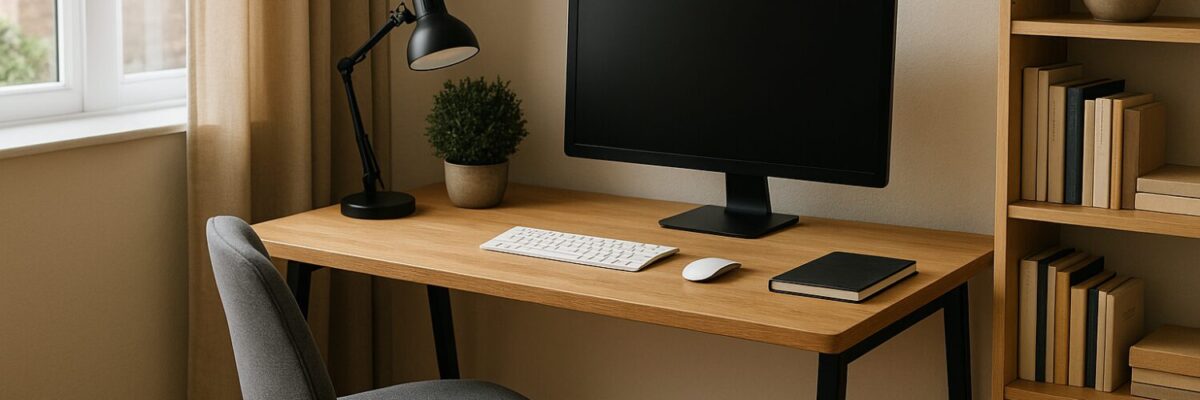
Creating a Functional Home Office That Supports Productivity and Comfort
Working from home has become more than a convenience; for many, it is a daily reality that requires intentional space design. A home office that truly functions well can transform how tasks get done and how comfortable the workday feels. Without thoughtful setup, distractions multiply and efficiency drops, making it harder to stay on track and maintain balance.
Designing a workspace at home involves more than just placing a desk in a corner. It calls for understanding how environment shapes focus, how equipment supports or hinders workflow, and how personal habits interplay with the physical setting. The goal is to create a spot that encourages sustained attention, reduces strain, and adapts to different needs throughout the day.
Choosing the Right Location Within Your Living Space
Where the home office is placed impacts everything from noise levels to natural light exposure. Ideally, this space should be separate enough to signal work time and boundaries, yet conveniently accessible to avoid friction when transitioning between roles. A room with a door offers control over interruptions and better privacy, but not everyone has that option.
Consider the flow of daily activity in the home. Avoid high-traffic areas where family members or roommates often pass through. The location should allow for some control over background noise, whether it’s facing away from the street or positioned away from household appliances. Windows provide natural light which can improve mood and alertness, but it is important to manage glare on screens with blinds or curtains.
Attention to power outlets and internet signal strength is practical but crucial. Running extension cords or relying on weak Wi-Fi can create ongoing hassle. If a spot lacks these essentials, planning upgrades ahead can save frustration later.
Essential Furniture and Ergonomics for Long-Term Use
Furniture choices directly affect comfort and health. A desk should be the right height to allow elbows to rest at about 90 degrees, preventing shoulder tension. Adjustable desks have gained popularity, allowing shifts from sitting to standing, which can reduce fatigue and encourage movement.
The chair is often the most important element in reducing physical strain. Features to look for include lumbar support, adjustable seat height, and a stable base with wheels for mobility. Investing in ergonomics pays off by minimizing back pain and improving posture.
While it might be tempting to repurpose kitchen chairs or sofas, these often lack the necessary support for hours of work. Ergonomic accessories like footrests or monitor stands can further enhance comfort by promoting proper alignment.
Technology and Equipment That Enhance Efficiency
The backbone of any home office is reliable technology. A computer or laptop with sufficient processing power depending on the work type is fundamental. Pairing this with a separate monitor can reduce eye strain and expand screen real estate, which is particularly helpful for multitasking.
Input devices such as keyboards and mice should be chosen with comfort in mind. Mechanical keyboards or those with ergonomic designs can reduce the risk of repetitive strain injuries. Wireless options offer flexibility but require consideration of battery life.
Good audio equipment is another factor often overlooked. Clear sound quality improves participation in virtual meetings and reduces the need to strain listening. Headphones with a microphone can help isolate calls from household noises.
Reliable, high-speed internet is non-negotiable. Slow connections disrupt workflow and increase stress. Investing in a quality router or using wired connections when possible can stabilize performance.
Lighting and Ambiance to Support Focus Without Fatigue
Lighting influences alertness and comfort. Natural light is beneficial, but it needs to be balanced with artificial sources to maintain consistent illumination during darker hours. Overhead lights combined with task lighting, such as adjustable desk lamps, offer control over brightness and direction.
Color temperature plays a role as well. Cooler light tones tend to boost alertness, while warmer tones create a relaxing atmosphere. Adjustable lighting that can shift between these settings allows customization based on time of day and task type.
Visual clutter can be distracting and mentally draining. Keeping the workspace tidy with adequate storage solutions helps maintain a calm environment. Shelving, drawers, or organizers prevent piles of paper and miscellaneous items from accumulating.
Common Pitfalls and What to Avoid When Setting Up a Home Office
Not all investments yield returns in a home office. For example, purchasing expensive gadgets that do not fit specific work needs can waste both money and space. It is important to evaluate how each piece of equipment contributes to daily tasks before acquiring it.
Overcrowding the workspace with unnecessary decor or multiple monitors can create visual noise and hinder concentration. Minimalism in layout often leads to better focus.
Ignoring ergonomics or neglecting breaks leads to discomfort and reduced productivity. Even the best setup requires users to move and adjust posture regularly.
Maintaining Flexibility and Adapting Over Time
Work styles and responsibilities evolve, and a home office should be adaptable. Modular furniture or easily rearranged layouts accommodate changing needs, whether adding space for collaboration or creating zones for different activities.
Regularly reassessing the setup can reveal new opportunities for improvement. Small adjustments, like repositioning a monitor or upgrading a chair, can make a significant difference in comfort and efficiency.
Incorporating personal touches that inspire without overwhelming can help sustain motivation. Plants, artwork, or meaningful objects add character and warmth, making the space inviting and conducive to long hours.
Bringing It All Together
Building a home office that works well involves a balance of practical considerations and personal preferences. Thoughtful location selection, ergonomic furniture, reliable technology, and appropriate lighting combine to create an environment supportive of productivity and wellbeing.
Recognizing common mistakes and remaining open to change ensures the workspace continues to serve evolving work demands. Ultimately, a functional home office is one that fits seamlessly into daily life, allowing focus without sacrificing comfort.
The investment in time and care to assemble such a space pays dividends in efficiency and satisfaction, helping work-from-home routines feel less like a challenge and more like an opportunity.
References and Further Reading
- Mayo Clinic – Office ergonomics: Your how-to guide
https://www.mayoclinic.org/healthy-lifestyle/adult-health/in-depth/office-ergonomics/art-20046169 - OSHA – Computer Workstations eTool
https://www.osha.gov/etools/computer-workstations - CCOHS – Office Ergonomics – The Modern Office
https://www.ccohs.ca/oshanswers/ergonomics/office/modern.html - American Optometric Association – Computer vision syndrome
https://www.aoa.org/healthy-eyes/eye-and-vision-conditions/computer-vision-syndrome
Recent Posts
- How Hybrid Technologies Are Shaping the Future of Sustainable Driving May 7, 2026
- Unlocking the Power of Everyday Foods to Lower Cancer Risk May 6, 2026
- Rethinking Work and Wealth: How People Are Redefining Life Beyond the 9-to-5 May 5, 2026
- Finding Balance: Reclaiming Control in a World Dominated by Screens May 4, 2026
- Keeping Your Garden Healthy: Practical Ways to Stop Unwanted Plants from Taking Over May 3, 2026